
Download Dreamlab – AI‑Powered Game Development Tool, Free Online Editor
Introduction: Why Dreamlab Is a Game‑Changer for Developers
In the fast‑moving world of indie game creation, the biggest bottleneck is often not talent but the overhead of setting up complex toolchains, managing SDK versions, and wrestling with networking code. Dreamlab arrives as a direct response to these pain points, offering a completely web‑based environment that removes the need for any local installation. By running entirely in the browser, Dreamlab eliminates the traditional “download‑and‑install” ritual, letting developers jump straight into prototyping from any device—whether that’s a high‑end Windows workstation, a MacBook, a Linux laptop, or even a tablet running Android or iOS.
The platform’s most striking feature is its AI‑driven code generator. Users can describe gameplay mechanics, UI elements, or even whole level designs in plain English, and the AI instantly produces clean, production‑ready JavaScript or TypeScript snippets. This dramatically reduces the amount of hand‑written code, cutting development time by up to 70 % for many common tasks.
Dreamlab also bundles real‑time collaboration tools, version history, and a built‑in asset creator that leverages AI to generate textures, sprites, and particle effects on the fly. The result is a seamless pipeline: concept → AI‑assisted implementation → in‑browser testing → one‑click publishing to a secure HTTPS sub‑domain. For solo creators, student teams, or small studios looking to iterate quickly without hefty infrastructure costs, Dreamlab offers a free entry point that scales with the project’s ambitions.
Its focus on security (TLS‑encrypted storage, GDPR compliance, two‑factor authentication) ensures that even commercial projects can be nurtured safely. In short, Dreamlab combines the speed of AI, the accessibility of the cloud, and the power of modern web standards to redefine how games are built today.
Core Features & AI‑Assisted Tools That Power Your Projects
- AI‑Generated Code Snippets: Type a natural‑language description (e.g., “add a health bar that decreases when the player takes damage”) and receive fully functional JavaScript/TypeScript code instantly.
- Multiplayer Integration Made Simple: Built‑in networking modules let you enable real‑time multiplayer with a single toggle, handling synchronization, latency compensation, and matchmaking behind the scenes.
- Template Library & Starter Packs: Choose from over 50 pre‑made game templates ranging from platformers to strategy board games, each fully customizable.
- Asset Creation Suite: Create animated characters, environment props, and particle effects directly in the browser using vector tools, sprite sheets, and AI‑driven texture generation.
- One‑Click Deployment & Free Domain: Publish your game instantly to a secure HTTPS sub‑domain (e.g., yourgame.dreamlab.io) with automated CDN caching for global performance.
- Collaboration & Versioning: Real‑time co‑editing, change history, and branch management let teams work together without conflicts.
- Cross‑Platform Export: Export your project to HTML5, Unity WebGL, or native mobile builds (Android/iOS) with a single click.
- Secure Cloud Storage: All assets and code are stored encrypted on Dreamlab’s servers, with regular backups and GDPR‑compliant privacy controls.
- Continuous Updates: The platform receives monthly AI model upgrades and new feature rollouts, ensuring you stay on the cutting edge without manual patches.
- Integrated Analytics Dashboard: Track player sessions, retention, and in‑game events directly from the Dreamlab console, helping you make data‑driven design decisions.
- Extensible Plugin System: Advanced users can attach custom NPM packages or third‑party libraries to the project, extending the core functionality while still benefiting from the AI assistant.
- Community Marketplace: Share your own templates, assets, or AI prompts with the community and earn recognition or monetary rewards through the Dreamlab marketplace.
Installation‑Free Setup, Workflow, and One‑Click Deployment
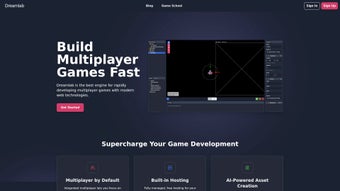
Because Dreamlab lives entirely in the cloud, the “installation” process is reduced to creating an account and signing in. Visit dreamlab.io, click “Sign Up,” and verify your email. Once logged in, you are greeted by a clean dashboard where you can start a new project, clone an existing template, or open a recent work‑in‑progress. The editor interface follows a familiar layout: a central canvas for the game view, a left‑hand panel for scene hierarchy, a right‑hand panel for properties and component settings, and a bottom console that displays AI prompts, build logs, and runtime errors.
Step‑by‑step workflow (expanded):
- Choose a Starting Point: Select “Blank Project” for total creative control, or pick a template that matches your game genre (e.g., “Top‑Down Shooter” or “Match‑3 Puzzle”). Templates come pre‑wired with basic input handling, UI scaffolding, and placeholder assets, allowing you to focus on unique gameplay.
- Define Gameplay with AI: Open the “AI Assistant” tab, type a description such as “Create a collectible coin that spins and adds 10 points when touched,” and click “Generate.” The AI parses your intent, writes a concise script, and automatically attaches it to the selected object. You can instantly preview the result in the canvas or edit the code for fine‑tuning.
- Design Assets: Use the built‑in sprite editor to draw characters, import PNG/SVG files, or ask the AI to generate textures from a textual prompt (“neon‑glow cyberpunk city background”). For animations, provide a single pose image and let the AI extrapolate walking or idle cycles, saving hours of manual frame‑by‑frame work.
- Configure Multiplayer (if needed): Toggle the “Multiplayer” switch, set player limits, and optionally enable a lobby system with chat. Dreamlab injects the necessary WebSocket handling and synchronizes object states across clients, abstracting away the complexities of latency compensation.
- Test In‑Browser: Click the “Play” button to launch a sandboxed preview. The console streams real‑time logs, and you can open developer tools to inspect network traffic or debug AI‑generated scripts. For multiplayer testing, open a second browser window or share the preview URL with a teammate.
- Iterate Rapidly: Make adjustments to code, assets, or physics parameters, then press “Refresh Preview.” Dreamlab preserves each change as a new version in the history panel, enabling you to revert to any prior state with a single click.
- Deploy with One Click: When satisfied, click “Deploy.” The platform bundles the project, optimizes assets, uploads the final package to a global CDN, and assigns a free sub‑domain (e.g., myadventure.dreamlab.io). You receive a shareable link instantly, and the deployment status is shown in the dashboard.
- Export for External Hosting: If you prefer to host the game on your own domain or submit it to an app store, use the “Export” option to download a static HTML5 folder. This folder contains the compiled JavaScript, minified assets, and an index.html file that can be uploaded to any web server, cloud bucket, or static‑site host.
- Continuous Updates: Return to the project at any time, apply new AI‑generated features, and redeploy. Dreamlab retains previous builds, allowing you to roll back or compare performance metrics across versions.
Because everything runs on standard web technologies (HTML5, WebGL, JavaScript), Dreamlab is future‑proof: as browsers evolve, the platform automatically inherits new performance improvements without requiring user intervention. This makes Dreamlab an ideal sandbox for rapid prototyping, classroom teaching, or even low‑budget commercial releases.
Compatibility, Pros & Cons – What to Expect Before You Dive In
Dreamlab is browser‑based, so it works on any modern operating system that supports Chrome, Firefox, Edge, or Safari. Whether you’re on Windows 10/11, macOS Monterey or later, a mainstream Linux distribution, or a mobile device running Android 12+ or iOS 15+, the editor functions identically. The only hard requirement is a stable internet connection; offline mode is currently in beta and supports limited editing of saved projects.
Pros
- Zero download – start developing instantly from any device with a supported browser.
- AI‑assisted coding reduces manual scripting by up to 70 % and accelerates learning for beginners.
- Built‑in multiplayer scaffolding eliminates the need for third‑party networking libraries.
- One‑click deployment to a secure, globally cached sub‑domain speeds up testing and sharing.
- Extensive template library accelerates prototyping and inspires new game ideas.
- Real‑time collaborative editing with version history fosters teamwork and reduces merge conflicts.
- Free tier includes unlimited projects, AI assistance, and public hosting.
- Monthly AI model upgrades keep the platform at the forefront of generative technology.
- Integrated analytics provide actionable insights without third‑party services.
- Secure cloud storage with encryption at rest and in transit protects intellectual property.
Cons
- Heavy reliance on internet connectivity; offline editing is limited to a beta feature.
- Advanced customizations may still require manual code edits or external libraries.
- Very large projects can hit browser memory limits, affecting performance during preview.
- Exporting to native mobile apps or consoles requires additional build steps outside Dreamlab.
- Free sub‑domains display Dreamlab branding; custom domains and white‑labeling are reserved for paid plans.
- While the AI is powerful, it sometimes generates generic code that needs refinement for optimization.
Review Summary: Dreamlab delivers a seamless, AI‑driven workflow that dramatically cuts development time while keeping the door open for deeper technical control. Its browser‑only nature is both a strength and a limitation, but for most indie projects the trade‑off is worthwhile.
Conclusion & Frequently Asked Questions
Dreamlab positions itself as the go‑to solution for developers who want to focus on creativity rather than configuration. By unifying AI code generation, multiplayer scaffolding, asset creation, and instant publishing under a single, secure web interface, it removes many of the friction points that traditionally slow down game production. Whether you are a student learning game design, a solo indie creator looking to launch a prototype quickly, or a small team needing collaborative tools, Dreamlab offers a free entry point that scales with your ambitions. The platform’s continuous updates ensure that the AI stays relevant, and the community‑driven template marketplace promises fresh ideas every month. If you’re ready to bring your game ideas to life without wrestling with complex toolchains, give Dreamlab a try today—sign up, create your first project, and watch your vision turn into a playable experience in minutes.
FAQ – Answers to Common Questions About Dreamlab
-
Is Dreamlab really free, or are there hidden costs?
Dreamlab offers a completely free tier that includes unlimited projects, AI‑assisted coding, and public hosting on a Dreamlab sub‑domain. Paid plans unlock custom domains, higher build priority, advanced analytics, and priority support, but there are no hidden fees for the core features.
-
Can I export my game to run offline or on a console?
Yes. Dreamlab lets you download the final HTML5 bundle, which can be served from any static web server for offline use. For console or native mobile deployment you’ll need to import the exported assets into a dedicated engine like Unity or Unreal, but the generated code is fully compatible with those environments.
-
How secure is my code and assets stored on Dreamlab’s cloud?
Dreamlab encrypts all data at rest and in transit using industry‑standard TLS 1.3. Access is protected by two‑factor authentication, and you can set project‑level permissions to control who can edit or view your work.
-
Do I need any programming experience to use the AI assistant?
No. The AI assistant is designed for users of all skill levels. You can describe functionality in plain language, and the system will generate clean code that you can accept as‑is or tweak for finer control.
-
What browsers are officially supported for the best experience?
Dreamlab works best on the latest versions of Chrome, Firefox, Edge, and Safari. All major browsers on desktop and mobile are supported, but for heavy projects we recommend using a desktop Chrome or Edge browser for optimal performance.
-
Is there an offline mode for working without internet?
A limited offline mode is currently in beta. It allows you to open previously saved projects and make basic edits, but AI code generation, cloud deployment, and real‑time collaboration require an active internet connection.



.png)



